Most nutrition and health trackers I’ve tried either lacked the feature I needed, buried it behind a paywall, or made logging tedious enough that I’d stop. So I built my own, following a few principles:
- Keep it simple. Include only the features I personally want.
- Frictionless logging. Describe a meal or workout out loud and it is logged.
- Sync across the services I actually use. I use Strava for cycling, but some sports I can’t wear a tracker for, so I log those manually and push them back so my history stays in one place.
Vanilla JS, Supabase backend, GitHub Pages hosting. No framework, no build step, no subscription.
Most importantly, lots of Claude tokens.
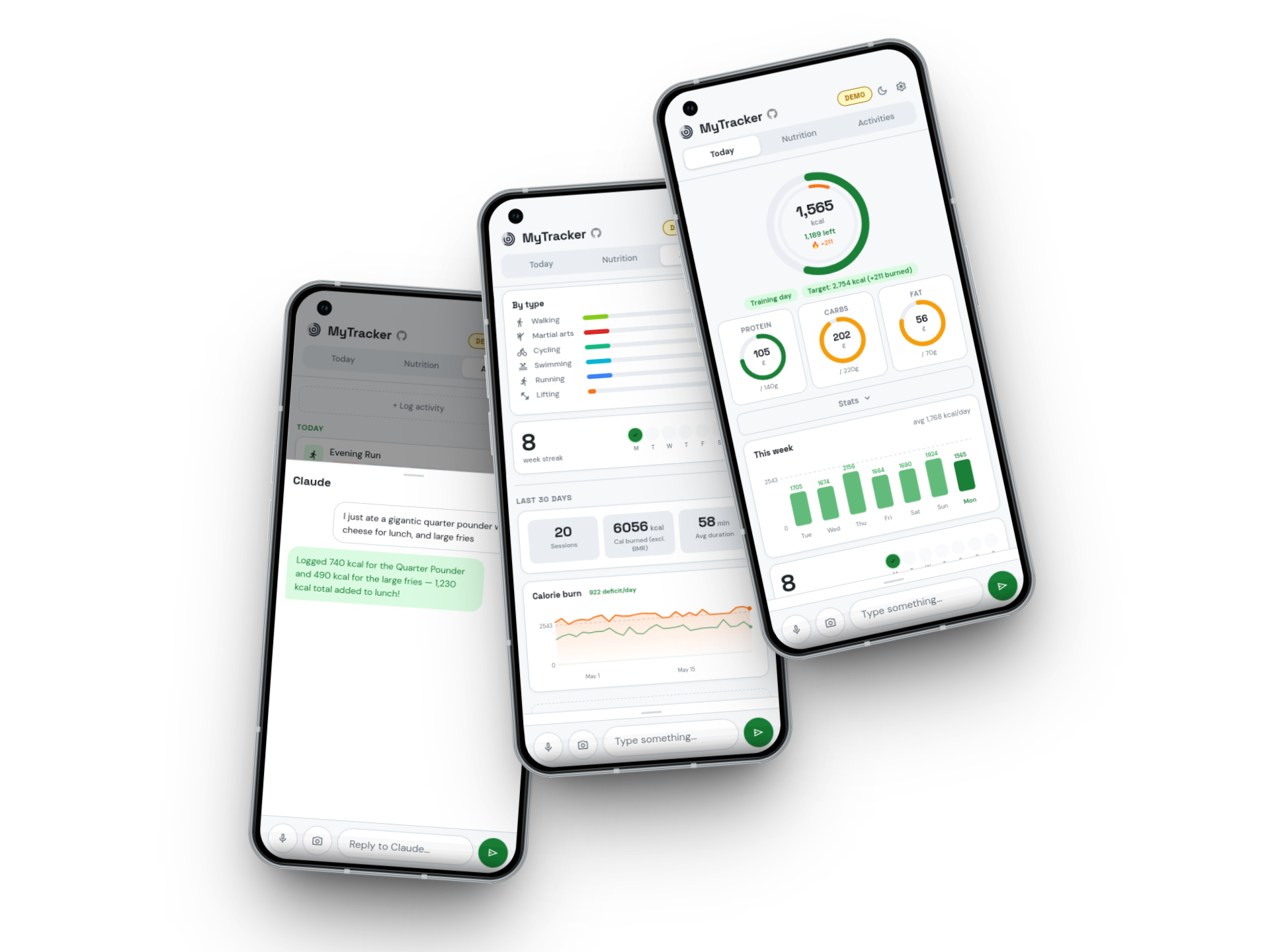
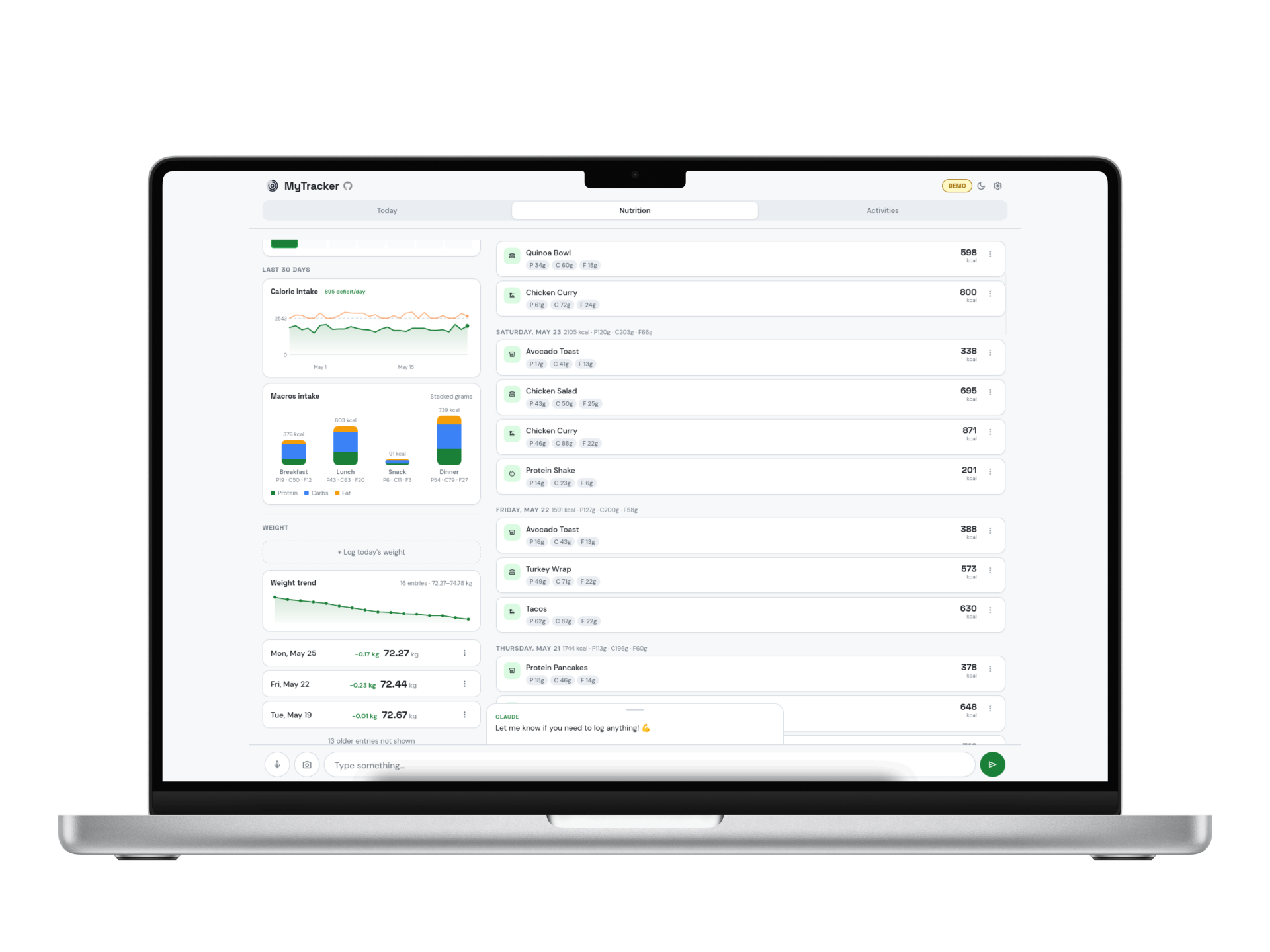
The sections below describe the visual components I designed and built for the app. Each one is interactive.
Activities & Nutrition
Both tabs are built around monthly calendars. The activity one marks training days with a sport icon coloured by type. The nutrition one shades each day by how close intake was to target (full green = on target within 25%, fading to grey further off, with a ↑ ✓ ↓ arrow). Each tab also has a full log for the selected month. The streak counts consecutive weeks with at least one workout and it resets if a complete Mon-Sun week passes with nothing logged.
Logging
My favorite feature! Describe a meal or workout in plain language and the app uses Claude to parse it and fill in the numbers. Text, photo, and voice all feed the same chat bar. Voice uses the Web Speech API and runs on-device. Attach a photo of your plate and Claude estimates from what it can see. The more specific you are, the tighter the estimate, but a description like “big bowl of pasta” works fine too.
Claude also has access to your preset library and recent history, so it can use that context to better infer what you likely mean. For example, if you always have the same breakfast on weekdays, or always log your Monday run as the same activity, Claude will pick up on that and suggest it without you spelling it out.
Calorie Tracking
The calorie ring fills as you log food toward your effective daily target. Three smaller rings track protein, carbs, and fat. Your base target is calculated from the Mifflin-St Jeor equation (BMR × activity multiplier, adjusted for deficit or surplus goal). With eat-back enabled, logged workouts add a fraction of net active calories burned to that day’s target, keeping rest days conservative without penalising training days.
The small triangle is a pace ticker. That is, where your ring would typically be at this point in the day, based on your last 30 days of meal history. Grey means behind your usual pace, orange means ahead, red means your historical rate would already fill today’s target (locks to 12 o’clock position).
Strava and Google Health
MyTracker syncs both ways with Strava and Google Health. Import runs on every app load and pulls workouts from either service so they count toward your daily calorie target. Push is optional and sends workouts you log directly in MyTracker back to the external service, keeping your activity history consistent everywhere.
Duplicate detection runs on every import. A workout that exists in both Strava and Google Health is matched by source ID and counted once, so the same activity never inflates your target twice. When both services are connected, you can also enable automatic cross-push, so that new Strava imports forward to Google Health automatically and vice versa.
PWA
MyTracker is designed as a Progressive Web App. You install it from the browser and it launches full-screen from your home screen like a native app, with no browser chrome in the way.
The alternative was building a proper iOS or Android app. That is a significant amount of work on top of what already exists. For a personal tool where the entire point is to stay lean, none of thats made sense.
A PWA gives most of what matters. The app is always on the latest version the moment you open it. Deploying a change is just a push to GitHub Pages. Voice input and the camera work exactly the same as they would in a native app. The only real limitation is that deep system integrations (background sync, widgets, health APIs) are more restricted than in a native app, but MyTracker does not need any of those.
Deployment
Most of the work on this project has happened on my phone, in short windows, using voice. I describe a bug or feature to Claude Code, it builds it, commits, and pushes to main. The deploy follows automatically in about 30 seconds. Basically, the same frictionless input the app is designed for applies to building it!
The pipeline is a GitHub Actions workflow: on push, it rewrites asset URLs in index.html with the current commit SHA (so browsers always fetch the latest version), generates version.js with that SHA, and injects env.js from GitHub Secrets so credentials are never in the repo. No build step locally.
version.jsenv.js from GitHub SecretsUnder the hood
Supabase handles auth, storage, and row-level security, so only your account can read or write your entries. The Claude API is called directly from the browser. Your Anthropic API key, Strava tokens, and Google tokens live in localStorage only and are never sent to MyTracker’s servers.
GitHub and Google OAuth are the only sign-in methods.